React and Express
How you can build the website you've always dreamed of

15 November 2022
Will this be a boring workshop?
We really hope not!
Please feel free to interrupt and ask questions, make this more of a conversation and less of a lecture.
- Brief introduction to HTTP and Node.js
- What is React and how to use it
- What is Express and how to use it
- Help us build our first website! (or something like that)
- Javascript
- Deep understanding of the Web and Node.js
- Databases
Please keep learning after this workshop! There are many people available to help you.
Your Hosts

Bruno Rosendo
MEIC 1st Year
(Almost) Senior Backend Engineer
João Mesquita
MEIC 1st Year
(Almost) Senior Frontend Engineer

HTTP
Holy-sh*t, This Title Pops
HTTP
Holy-sh*t, This Title Pops
No, but really
Hypertext Transfer Protocol
HTTP
HTTP is a protocol used to communicate between two machines, currently used in web applications.
In a simple form:
- Client makes a request
- Server receives and handles the request
- Server sends a response
- You get to see cats on your screen
HTTP

HTTP Methods
HTTP has many methods, so we'll only show the most common:
GETUsually used to read or fetch resources. Should not have secondary effects on the server.POSTUsually used to interact with a resource, often causing a change in state or side-effects.PUTUsually used to create/replace entities. Should be idempotent - No matter how many times you call it, the result is the same.PATCHUsually used to apply partial updates to a resource.DELETEUsually used to delete a resource.
HTTP Status
Each HTTP Response has an associated Status code.
1XXInformation2XXSuccess3XXRedirects4XXClient error5XXServer error
Check out https://http.cat !
HTTP Status
Some examples:
201 CreatedAfter a successful creation of a resource301 Moved PermanentlyUseful for crawlers to know when a webpage has been moved to another location401 UnauthorizedRequires authentication to access the resource404 Not FoundThe requested resource does not exist418 I'm a teapotAn HTTP easter-egg503 Service UnavailableThe server is not ready to handle the request. Maybe it's under heavy load, or undergoing maintenance
API
API (Application Programming Interface) is the specification of methods through which you can interact with a service. Often web applications use REST APIs.
Some common public APIs:
- Google Maps API https://maps.googleapis.com
- Twitter API https://api.twitter.com
- NIJobs API https://ni.fe.up.pt/nijobs/api
HTTP web server applications
The server will receive the request and handle it
Web applications are simply programs that listen for requests and send responses, using the HTTP protocol.
Almost any language has its version of an http server module.
The most common are Java, Python, C# and Node.js.
Today, we'll look specifically into Node.js
Node.js
Why was the JavaScript developer sad?
Node.js
Why was the JavaScript developer sad?
Because he didn't Node how to Express himself
Node.js
Node.js is a server-side language that uses V8 JavaScript engine, which means you can use (almost) the same language you have to use on the browser, but now on the server as well!
const http = require('http');const server = http.createServer(function (req, res) { res.write('Hello World!'); // write a response to the client res.end(); // end the response});server.listen(80); //the server listens on port 80 (HTTP default)npm
npm is the package manager for Node.js. The basic commands you need to know are:
# Bootstraps the project, creating the package.jsonnpm init# Adds a dependency to package.json and installs it locally npm install <package># Runs a command as defined in the `scripts` section on package.jsonnpm run <cmd>npm
And that's where they come in!

React is a library for building user interfaces (aka Frontend)

Express is a minimal framework used to build web servers (usually Backend)
React
Declaring UI instead of handling every state change manually
Let's welcome our Frontend Guy!
Disclaimer
You will not learn React (or any Language / Lib / Framework, really) in a day.
We purposefully left some (somewhat relevant) parts out because We're about to give a lot of information at once, which can be counter-productive.
It is normal if you feel lost in the beginning, don't give up and eventually all will start to make sense.
Never stop learning.
React
What is it, really?
React
React is a JavaScript library that automatically renders and handles component updates on a <div> of your website.
ReactDOM.render( <App />, document.getElementById("root"));React
This allows it to run wherever inside an existing website. You can even migrate progressively from old UIs to React-powered UI components.
React is just glorified JavaScript. Always keep this in mind! Most of the problems you'll face are just JavaScript problems.
To use React, you just need to load it in a script tag in your HTML.
React in an HTML page
<html lang="en"> <head> <meta charset="utf-8"> <title>NIJobs</title> <link href="https://ni.fe.up.pt/st4g1ng/nijobs/static/css/main.4f9a2d8f.chunk.css" rel="stylesheet"> </head> <body> <noscript>You need to enable JavaScript to run this app.</noscript> <div id="root"></div> <!-- React source code --> <script src="https://ni.fe.up.pt/st4g1ng/nijobs/static/js/2.8ac0d13b.chunk.js"></script> <!-- Application source code, using React --> <script src="https://ni.fe.up.pt/st4g1ng/nijobs/static/js/main.df8d00d7.chunk.js"></script> </body></html>React is only the View
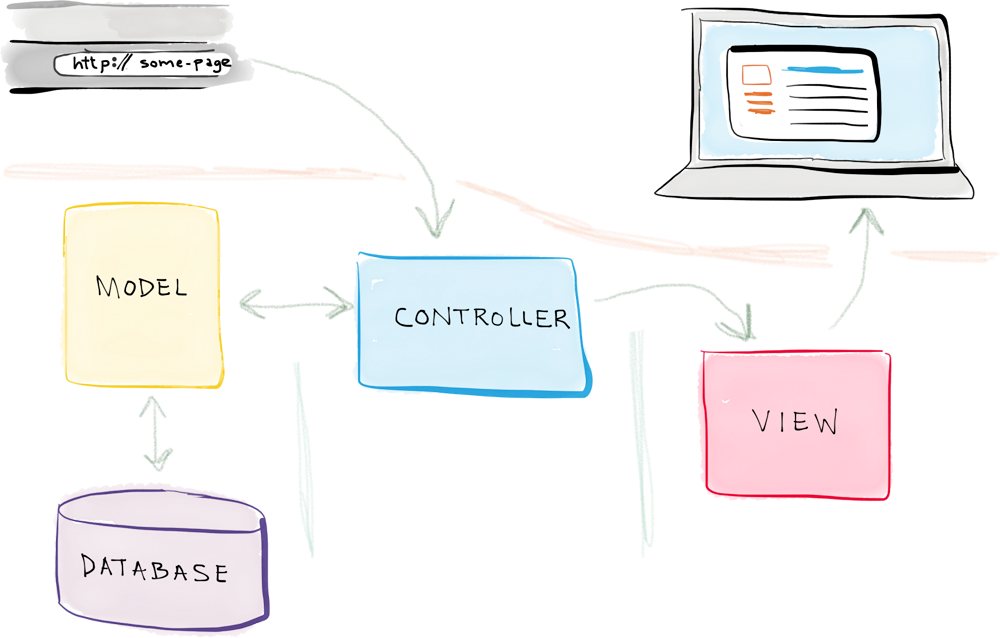
In a typical web application, you have 3 layers:
- Data Layer - Stores the data of the application (Users, posts, comments, etc...).
- Logical Layer - Manages the interactions between the View Layer and the Data Layer (An HTTP API for example).
- View Layer - The page that is visible to users and with which they can interact.
React is designed to only be used in the View Layer.
Declarative vs Imperative Paradigms
In Imperative programming, you define exactly what will be done and how.
In Declarative programming, you define what happens depending on some state.
Imperative Programming
function markSelected(id) { const item = document.getElementById(id); item.classList.add("selected");}Array.from(document.getElementsByClassName("todo-item")) .forEach(elem => elem.addEventListener("click", markSelected(elem.id)))Declarative Programming (in React)
const [items, setItems] = useState([{isSelected: false, text: "TODO1"}])const toggleItemSelection = (i) => { setItems((items) => { const updatedItems = cloneDeep(items); updatedItems[i].isSelected = !items[i].isSelected return updatedItems });}items.map((item, i) => ( <p className={item.isSelected && "selected"} onClick={toggleItemSelection(i)} > {item.text} </p>))Context Sum up
- React is NOT a website maker.
- There are no "React websites". There are websites that USE React.
- This is why React is a library and not a framework.
- React uses declarative programming to design the interface components, making them rely on a state, instead of requiring you to specify exactly how they should modify themselves. React handles the DOM changes for you :)
React Theory
Now it will start to make sense, I hope
JSX
React uses an HTML-in-JS language (JSX) that lets you specify the components similarly to how you would do it in regular HTML.
<div className="meteorolgy-widget"><p>{"This is Javascript. " + "Today it's " + getMeteoPrediction()}</p>{ weeklyPredictions.map(prediction => ( <p>{prediction.day + " - " + prediction.state}</p> ))}</div>There are some differences like using className instead of class, and allowing you to have JavaScript sections to generate some parts of it.
Components
React is based on a tree of components, recursively rendered: a component can render none or multiple children, which will be other components, which will be rendered themselves, and so on.
const NewsWebpage = ({news, ads}) => ( <> // Special "dummy" component - React.Fragment <NewsArea news={news}/> <AdsColumn ads={ads}> </>)Good Practice: Create small and simple components, responsible for the minimum possible logic
Components - Props
Components can receive a props object to use when creating the rendering logic, in order to change dynamically.
Components always have a children prop representing their children components.
Components - Props
const WrapperThatAddsAnHelloV1 = (props) => ( <> <p>Hello,</p> <p>{props.name}</p> </>)const WrapperThatAddsAnHelloV2 = (props) => ( <> <p>Hello,</p> {props.children} </>)const MyPage = () => ( <> <WrapperThatAddsAnHelloV1 name="World"/> <WrapperThatAddsAnHelloV2> <p>World</p> </WrapperThatAddsAnHelloV2> </>)DOM and VDOM
DOM (Document Object Model) is the browser's representation of a web page.
<html> <head> <title>DOM</title> </head> <body> <p>Hello World</p> </body></html>React has the concept of the Virtual DOM, which it stores internally to manage the components' state.
VDOM
Virtual DOM as it only updates the relevant components instead of the whole page when rendering components in the browser.
Reconciliation Phase
When the VDOM changes, those are mapped to instructions to update the real DOM (append, delete and update operations). These instructions are generated by comparing the new version of the VDOM with the older one, and generating the minimum set of operations required to change it on the DOM*.
* This is a known problem for which state-of-the-art algorithms have a complexity in the order of O(n^3), n being the number of tree elements.
Reconciliation Optimizations
If we used this in React, displaying 1000 elements would require in the order of one billion comparisons. This is far too expensive. Instead, React implements a heuristic O(n) algorithm based on two assumptions:
- Two elements of different types will produce different trees.
- The developer can hint at which child elements may be stable across different renders with a key prop.
Reconciliating Lists
By default, when recursing on the children of a DOM node, React just iterates over both lists of children at the same time and generates a mutation whenever there’s a difference.
For example, when adding an element at the end of the children, converting between these two trees works well:
<ul> <!-- before --> <li>first</li> <li>second</li></ul><ul> <!-- after --> <li>first</li> <li>second</li> <li>third</li></ul><li>first</li> trees, match the two <li>second</li> trees, and then insert the <li>third</li> tree.Reconciliating Lists
If you implement it naively, inserting an element at the beginning has worse performance. For example, converting between these two trees works poorly:
<ul> <!-- before --> <li>Duke</li> <li>Villanova</li></ul><ul><!-- after --> <li>Connecticut</li> <li>Duke</li> <li>Villanova</li></ul>React will mutate every child instead of realizing it can keep the <li>Duke</li> and <li>Villanova</li> subtrees intact. This inefficiency can be a problem.
Keys
In order to solve this issue, React supports a key attribute. When children have keys, React uses the key to match children in the original tree with children in the subsequent tree. For example, adding a key to our inefficient example above can make the tree conversion efficient:
<ul> <li key="2015">Duke</li> <li key="2016">Villanova</li></ul><ul> <li key="2014">Connecticut</li> <li key="2015">Duke</li> <li key="2016">Villanova</li></ul>Now React knows that the element with key '2014' is the new one, and the elements with the keys '2015' and '2016' have just moved.
Keys
Usually, React will let you know when you have some list of mutating children and you should be using keys.
But there are some things to consider before choosing your keys:
- They must be unique among the elements of the same list.
- They must be constant during the life of the element on the list.
Component Lifecycle
In order to interact with the Virtual DOM, React lets you use React Components, which can be classes or functions (we’ll use functions) that represent a part of the website and can contain more components inside them.
These React Components are bound by a Lifecycle that manages their existence and interactions, which reflect on the actual DOM after the Reconciliation Phase.
Component Lifecycle
There are 4 steps:
- Mounting (When the component is first added to the DOM):
- The methods and events that take place here happen as the component is mounted in the DOM.
- Updating (When the state or one of the props change, or if parent re-renders*):
- Here the methods and events take place after the React component has entered the DOM.
- Un-mounting:
- Here the methods and events take place as they React component leaves the DOM or is unmounted from the DOM.
- Error Boundaries:
- This is a special category that deals with handling or gracefully catching errors in order not to totally break your React application render.
* Might not happen if the child component is memoized with React.memo(), for example.
React Hooks
React Hooks are JavaScript functions that can interact with the component, by executing specific actions during the component lifecycle.
React exposes some default hooks, but you can create custom hooks which call React's ones for more complex scenarios.
There are two rules when using React Hooks:
Only Call Hooks at the Top Level
- Don’t call Hooks inside loops, conditions, or nested functions. Instead, always use Hooks at the top level of your React function.
Only Call Hooks from React Functions
Don’t call Hooks from regular JavaScript functions. Instead, you can:- Call Hooks from React function components.
- Call Hooks from custom Hooks
Common React Hooks
useState(initialState)
Let's you store some state in-between re-renders. If you pass a function as the initial value, it will only run it on the first render.
Returns an array where the first value is the state value and the second is a setter function for that value.
It's recommended you have a separate state for every variable you want to store, instead of a giant object with a field for each.
const [count, setCount] = useState(0);const incrementCounter = () => { setCount(count + 1)}const decrementCounter = () => { setCount(currentCount => currentCount - 1)}Common React Hooks
useState(initialState): setState(val) vs setState(fn)
Using the function version is better due to async updates. If you call incrementCounter in rapid succession, React will batch the updates and race conditions may prevent the counter from updating multiple times, i.e. the count variable will not update in between calls.
Using an updater function, the "current state" variable is always correct.
Common React Hooks
useEffect(fn, [...dependencies])
Lets you execute code at different stages of the lifecycle. It is called at every render, but it might do nothing, depending on the dependencies.
useEffect(() => { // This will run on every render})Notice the undefined dependency array. This is the same as not calling useEffect, and writing the code directly on the component.
Common React Hooks
useEffect(fn, [...dependencies])
useEffect(() => { // This will run on mount only}, [])Notice the empty dependency array, indicating that the code will run at mount only.
Common React Hooks
useEffect(fn, [...dependencies])
useEffect(() => { // This will run every time the dependencies change console.log(foo, bar)}, [foo, bar])foo and bar might be some component props or variables created inside the component that depend on props. If the props change, making foo or bar change, the useEffect function will be executed.
Does NOT execute if the references to the dependencies don’t change.
Common React Hooks
useRef(initialValue)
useRef is similar to useState, however it does NOT trigger anything on change. It's just a mutable JavaScript object with a current field which stores whatever.
It's also used to store references to DOM elements, so that you can program something imperatively, if needed.
function TextInputWithFocusButton() { const inputEl = useRef(null); const onButtonClick = () => { inputEl.current.focus(); // `current` points to the mounted text input }; return ( <> <input ref={inputEl} type="text" /> <button onClick={onButtonClick}>Focus the input</button> </> );}Custom React Hooks
We can create a function that calls any React Hook and call it as if it were a React Hook, for more complex scenarios.
function useForm(fieldOptions) { const initialState = Object.entries(fieldOptions).map(...) const [fields, setFields] = useState(initialState) const setField = (fieldName) = (val) => { setFields(fields => ({ ...fields, [fieldName]: val })) } return [fields, setField];}Common libraries/API that you must know
PropTypes
Since React is programmed in JavaScript, props DON'T have types by default. This can lead to some errors if you're not careful.
PropTypes lets you define the types for you component props, and even if they are required or not.
const SomeComponent = ({prop1, prop2, prop3}) => ()SomeComponent.propTypes = { prop1: PropTypes.string.isRequired, prop2: PropTypes.func, prop3: PropTypes.oneOf(["first", "second", "third"]).isRequired,}Calling APIs - Fetch
In order to make requests to an HTTP API, you can use the built-in JS library fetch, or some external package such as Axios.
try { const response = await fetch(`${API_HOSTNAME}/offers`, { method: "GET", }); if (!response.ok) { // Any HTTP status non 2xx will make ok = false } // If the response is JSON, call .json() which returns a Promise const json = await res.json(); } catch (error) { // Handle Network Error}React Router
React Router allows you to simulate different pages in your application.
<BrowserRouter> <Switch> <Route exact path="/" > <HomePage/> </Route> <Route path="/apply/company" > <CompanyApplicationPage/> </Route> </Switch></BrowserRouter>React Router
When you define different Routes, technically, it will NOT create different pages. The user will still access "/", which will then load the application code and then the rest of the path will be parsed and a different component will be rendered, depending on the route.
This is why when you have an "only React with React Router" web application, you need to re-route all pages to "/", so that they are resolved by React, instead of the web server itself.
Redux
Redux allows you to centralize your application's state and logic enables powerful capabilities like undo/redo and state persistence.
Redux is made for JavaScript in general, but it has specific bindings for React, which are really useful.
* Learn more about redux here or in the oficial docs.
MaterialUI
Wrapping up in style.
Material UI --- Theme
You can specify the application theme with some UI defaults such as colors palette, the font type, spacing settings, etc...
This way, every time you are creating a UI, you don't have to worry about making everything consistent.
Usually, it's placed at the top of the Component Tree.
Material UI --- Theme
const theme = responsiveFontSizes(createMuiTheme({ palette: { primary: { main: "#DC4F47", }, secondary: { main: "#4F1315", }, }, typography: { fontFamily: [ "Poppins", "Roboto", "sans-serif", ].join(","), },}));<ThemeProvider theme={AppTheme}> <App/></ThemeProvider>Express
How to make React actually useful

I hope the Backend guy isn't sleeping yet
REST to the RESCue
REST (Representational State Transfer) uses HTTP Status and URI rules to give meaning to calls and represent resources and operations.
Instead of GET /getStock?beverageType=water
we have GET /beverages/water/stock
POST /buy{ beverageType: water, quantity: 2, paymentMethod: { type: "credit-card", id: "1111-1111-1111-1111" ... }}POST /water/buy{ quantity: 2, paymentMethod: { type: "credit-card", id: "1111-1111-1111-1111" ... }}REST
REST focuses on Resources and Operations, instead of behaviors. You don't call functions. You don't even know which functions exist. Only need to know about resources, and what you can do with those.
Often, the same URL is used but, by changing the HTTP Method, it gives a completely different meaning:
POST /posts/new # Creates a new postGET /posts/new # Fetches the latest postsExpress
Express is a web framework that abstracts some of the work involved in creating a web server in Node.js. It offers us neat feature like routing and middleware, which we'll see later on.
const express = require('express');const app = express();const port = 80;app.get('/', (req, res) => { res.send('Hello World!');})app.listen(port, () => { console.log(`Example app listening at http://localhost:${port}`);})Why don't we just use Node.js?
Here's how a simple server would look like in Node.js:
const server = http.createServer(function (req, res) { const endpoint = req.url; if(endpoint == '/') { res.write('hello world'); } else if(endpoint == '/bruno'){ res.write('hello Bruno'); } else if(endpoint == '/joao'){ res.write('hello João'); } else { res.write('hello stranger'); } res.end();});Let's now try to use "parameters"
const server = http.createServer(function (req, res) { const endpoint = req.url; const params = endpoint.split('/'); // Are these really parameters? // What if we have something like /bruno/goodbye? if (params.length > 1) { const name = params[1]; res.write(`hello ${name}`); } else { res.write('hello world'); } res.end();});We're expecting /:name, we need to make sure we don't affect other endpoints!
const server = http.createServer(function (req, res) { const endpoint = req.url; const params = endpoint.split('/'); // Are these really parameters? if (params.length > 2) { // Can you actually scale this? res.writeHead(StatusCodes.NOT_FOUND); res.write("The opereration is not supported"); } else if (params.length == 1) { const name = params[1]; res.write(`hello ${name}`); } else { res.write('hello world'); } res.end();});What about error handling? I think you're starting to see the problem...
const server = http.createServer(function (req, res) { const endpoint = req.url; const params = endpoint.split('/'); // Are these really parameters? if (params.length > 2) { // Can you actually scale this? res.writeHead(StatusCodes.NOT_FOUND); res.write("The opereration is not supported"); } else if (params.length == 1) { const name = params[1]; if (typeof name == 'string') { if (name == "andre") { res.writeHead(StatusCodes.FORBIDDEN); res.write('You were banned from our website!'); } res.write(`hello ${params.name}`); } else { res.writeHead(StatusCodes.BAD_REQUEST); res.write('Invalid name!'); } } else { res.write('hello world'); } res.end();});Node.js + Express.js = ❤️
function validName(req, res, next) { if (typeof req.params.name != 'string') { res.status(StatusCodes.BAD_REQUEST).send('Invalid name!'); return; } next();}function isNameForbidden(req, res, next) { if (req.params.name == 'andre') { res.status(StatusCodes.FORBIDDEN).send('You were banned from our website!'); return; } next();}app.get('/:name', validName, isNameForbidden, (req, res) => { res.send(`Hello ${req.params.name}!`);})app.get('/', (req, res) => res.send('Hello World!'))Routing
Routing is how an application responds to a client request to a particular endpoint (URI) and request method (GET, POST, etc.).
app.get('/', (req, res) => { res.send('Hello World!')})app.post('/', (req, res) => { res.send('Got a POST request')})app.put('/user', (req, res) => { res.send('Got a PUT request at /user')})app.delete('/user', (req, res) => { res.send('Got a DELETE request at /user')})Route Parameters
You can think about Route Parameters as variables lying in the URL itself. The values are stored in the req.params object, with the name specified in the path as the key.
app.get('/:name', (req, res) => { res.send(`Hello ${req.params.name}!`);})There are more ways of handling route paths, like regex and wildcards. You can read about them here.
Query parameters, such as /?name=bob, are also common and stored in the req.query object.
Multiple Routers
In order to have a modular application, we can use multiple routers. You can think of a router as a mini-app. You have two ways of doing this:
app.route('/book') .get((req, res) => { res.send('Get a random book'); }) .post((req, res) => { res.send('Add a book'); }) .put((req, res) => { res.send('Update the book'); })const router = express.Router();app.use("/book", router);// Translates to /book/buyrouter.post("/buy", (req, res) => { res.send("Buy a book");});Middleware
Middleware functions run between the request arrival and the route handler, so it's useful for validation or or some logic you want to run every time you receive a request.
They have access to the request object (req), the response object (res), and the next function. next is a special function in the Express router which, when invoked, executes the middleware succeeding the current one.
function isNameForbidden(req, res, next) { if (req.params.name == 'andre') { res.status(StatusCodes.FORBIDDEN).send('You were banned!'); return; } next();}app.get('/:name', validName, isNameForbidden, (req, res) => { res.send(`Hello ${req.params.name}!`);})Error Handling
You can define error-handling functions the same way as other middleware functions, except with four arguments instead of three: err, req, res, and next.
You can use app.use() to define a global middleware, including an error handler.
app.use((err, req, res, next) => { console.error(err.stack) res.status(StatusCodes.INTERNAL_SERVER_ERROR).send('Something broke!')})Response Methods
The res object has a lot of methods for sending responses to the client. Here are some of the most common ones:
- res.send() - Sends a response of any type.
- res.json() - Sends a JSON response.
- res.status() - Sets the status code of the response.
- res.redirect() - Redirects the request to another URL.
- res.sendFile() - Sends a file.
You can read more about them here.
Express Validators
Express has a package called express-validator that can be used to validate the request body, params, query, headers, and cookies.
const { body, validationResult } = require('express-validator');app.post('/user', body('email').isEmail(), // must be an email body('password').isLength({ min: 5 }), // must be at least 5 chars long async (req, res) => { const errors = validationResult(req); if (!errors.isEmpty()) { return res.status(StatusCodes.BAD_REQUEST).json({ errors: errors.array() }); } const user = await User.create( {email: req.body.email, password: req.body.password}); res.json(user); },);Express Validators
There are a lot of available validators, you can check them here.
- isString() - Checks if the value is a string.
- notEmpty() - Checks if the value is not empty.
- custom(validator) - Checks if the value passes a custom function.
- withMessage(message) - Adds a custom error message.
- bail() - Stops the validation chain if the current validator fails.
- optional() - Marks the current validation chain as optional.
{ "errors": [ { "location": "body", "msg": "Invalid value", "param": "email" } ]}Body Parser
You'll often want to develop an API that accepts JSON data (or another format). In order to do that, you need to parse the request body.
Before Express 4.16.0, you needed to install a package called body-parser to parse the request body as JSON. Now, you can simply use the express.json() method.
app.use(express.json());CORS
Currently Out of Rad Subtitles
CORS
Currently Out of Rad Subtitles
No, but really
Cross-Origin Resource Sharing
CORS
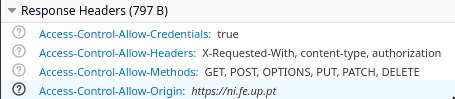
CORS (Cross-Origin Resource Sharing) is a mechanism that uses additional HTTP headers to tell a browser to let a web application running at one origin (domain) have permission to access selected resources from a server at a different origin.
Due to this, you cannot make requests to services in different locations by default. This is the most common error for beginner web developers.


Putting the hands on the pasta
Direct translations from Portuguese never work...
The Iconic To-Do List App
git clone https://github.com/NIAEFEUP/react-express-ws-2022.git/
Let's build a simple to-do list app using React and Express. We already started the project but we need your help to finish it!
You'll find many TODOs in the code, and you'll need to complete them to make the app work. They are ordered by priority but you can do them in any order you want.
The frontend folder contains the React app and the backend folder contains the Express app. Read the READMEs in each folder for more information.